Using Looker
Home Home Home
Home Home Home
Search Search
  • SHOP
  • DONATE
  • Cookies Cookies Cookies
  • Contact Us Contact Us Contact Us
  • Forms Forms Forms
  • Espanol Espanol Espanol
  • Rallyhood Rallyhood Rallyhood
  • MY GS MY GS MY GS
  • Calendar Calendar Calendar
  • Search Search
  • Discover Discover

    About Us About Us

    • What Girl Scouts Do What Girl Scouts Do
    • Our History Our History
    • Belonging, Inclusion, Diversity, Equity BIDE
    • Social Issues & Religion Social Issues & Religion

    Activities Activities

    • Event Calendar Event Calendar
    • Preferred Program Partners Preferred Program Partners
    • Girl Scout Experience Box Girl Scout Experience Box

    Our Council Our Council

    • Contact Us Contact Us
    • Staff Directory Staff Directory
    • Weddings & Special Events Weddings & Events
    • Blog Blog
    • The Girl Scout Advantage Podcast The Girl Scout Advantage Podcast
    • Publications Publications
    • Alumnae Alumnae
    • Member Advisory Committee MAC
    • Board of Trustees Board

    Discover your local Girl Scout council: about Girl Scouts, what they do, what activities are available locally, and how to contact us.

  • Get Involved Get Involved

    Become a Girl Scout Become a Girl Scout

    • Join a Troop Join a Troop
    • Go Solo Go Solo
    • Tell Me More Tell Me More
    • The Benefits of Girl Scouting The Benefits of Girl Scouting

    Become a Volunteer Become a Volunteer

    • Start a Troop Start a Troop
    • Other Ways to Volunteer Other Ways to Volunteer

    Support Us Support Us

    • Ways to Give Ways to Give
    • Cookie Bake-off Benefit Cookie Bake-off Benefit
    • Barrels & Badges Barrels & Badges

    Learn how to get involved with Girl Scouts: join a troop, go solo, or become a volunteer.

  • Cookies & Treats Cookies & Treats

    Cookie Program Cookie Program

    • Cookie Sellers Resources For Cookie Sellers
    • Volunteer Cookie Resources Volunteer Cookie Resources
    • Find Cookies Find Cookies
    • Meet the Cookies Meet the Cookies
    • Donate Cookies Donate Cookies
    • Cookie Entrepreneur Family Pin Cookie Entrepreneur Family Pin

    Fall Product Program Fall Product Program

    • Find Treats Find Treats
    • Fall Product Seller Resources Fall Product Seller Resources
    • Fall Product Volunteer Resources Fall Product Volunteer Resources

    Find out how to buy Girl Scout Cookies and Fall Products, explore Girl Scout Cookie flavors, try delicious recipes, see how girls learn essential life skills, and more.

  • Camp Camp

    Camps & Cabins Camps & Cabins

    • Camp Linden Camp Linden
    • Camp Merrie Woode Camp Merrie Woode
    • Camp O' the Hills Camp O' the Hills

    Ways to Camp Ways to Camp

    • Family & Troop Overnight Rentals Family & Troop Overnight Rentals
    • Weddings & Events at Camp Weddings & Events at Camp

    Summer Camp Summer Camp

    • All Around Programs All Around
    • Horse Programs Horse Programs
    • Specialty Programs Specialty Programs
    • Leadership Programs Leadership Programs
    • Troop and Family Programs Troop and Family Programs
    • Day Camp Day Camp
    • Camp FAQ's Camp FAQ's

    There's so much to explore at camp. Whether it's overnight in the summer, a day trip with the troop, or a weekend getaway with the family, every girl can discover the magic of Girl Scout Camp!

  • Members Members

    For Girl Scouts For Girl Scouts

    • Renew Your Membership Renew
    • Uniforms and Badges Uniforms and Badges
    • Highest Awards Highest Awards
    • Honor Troop Honor Troop
    • Media Girls Media Girls
    • National Council Session National Council Session
    • Mackinac Island Service Program MISSP

    For Volunteers For Volunteers

    • Volunteer Essentials Volunteer Essentials
    • Forms and Documents Forms and Documents
    • Ready to Go Kits Pre-made Program Kits
    • Troop Year Planner Troop Year Planner
    • Troop Travel Troop Travel
    • New Leaders New Leaders

    For Parents & Families For Parents & Families

    • The Trefoil Times The Trefoil Times
    • Financial Assistance Financial Assistance
    • Monthly Newsletter Monthly Newsletter
    • Preferred Program Partners Preferred Program Partners

    Resources for Girl Scout members. Find volunteer, Girl Scout, and family tools and support. Explore badges, activities, and more.

  • SHOP
  • DONATE
  • Cookies Cookies Cookies
  • Contact Us Contact Us Contact Us
  • Forms Forms Forms
  • Espanol Espanol Espanol
  • Rallyhood Rallyhood Rallyhood
  • MY GS MY GS MY GS
  • Calendar Calendar Calendar
  • Search Search

Council Finder

Use this finder to connect with your local Girl Scout council.

By ZIP Code

By State

By Council

close
You are leaving girlscouts.org for a website opened by an external party. You will be subjected to the privacy and security policies of the website

  1. Members
  2. For Volunteers
  3. Using Looker

Using Looker

Looker is an online tool that core community/area volunteers can use to access real time membership data for their community/area. Looker replaces our previous method of distributing rosters through bi-weekly emails. Now community/area volunteers can log in any time to view data on all current Girl Scout members in their area. New memberships and updates to current membership data sync overnight and will appear in Looker the following day.

Accessing Looker

All currently registered, core community/area volunteers have access to Looker. Looker can be used from any computer or electronic device with internet capability. The tool can be accessed at girlscouts.looker.com

How Do I Set Up My Looker Account? toggle arrow

Navigate to: girlscouts.looker.com

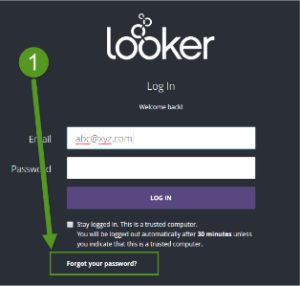
  1. Click on ‘Forgot your password’.
  2. Enter your email address and click on ‘RESET PASSWORD’.
    Note: Please utilize the same email address that is used to log on to your MyGS account when creating your Looker account.
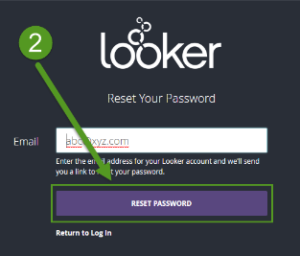
  3. See the following screen and then go to your email mailbox.
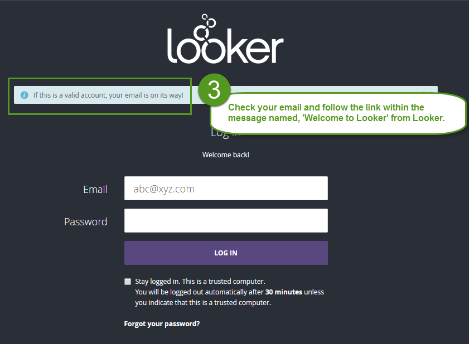
  4. Find an email named ‘Welcome to Looker’.
    *If you have trouble seeing the email try checking your SPAM folder.
  5. Click on the long link in the email message.
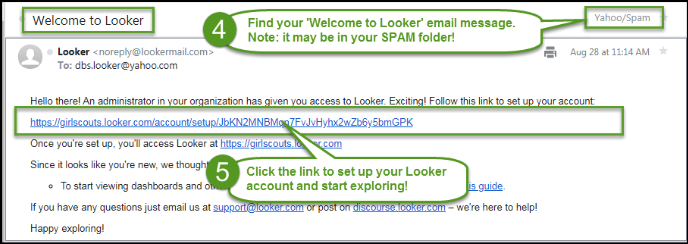
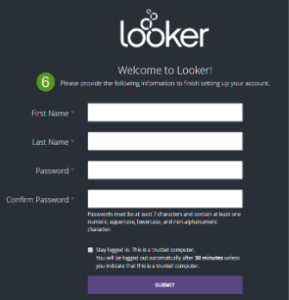
  6. Set up your first name, last name and password.
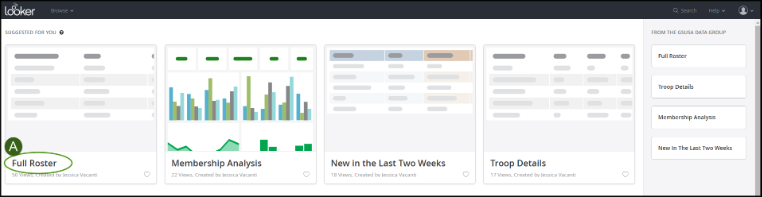
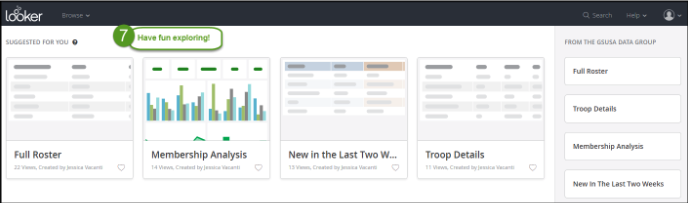
  7. You will see this ‘Home’ page from where you can navigate to several dashboards.
  8. In the future, you can login to Looker at any time by navigating to girlscouts.looker.com

Navigating Looker

Always click on the top left hand side of any screen to return to Looker’s ‘Home’ page where each of the four dashboards and sidebar can be accesed.

Full Roster Dashboard toggle arrow

Full Roster – Location on Home Page

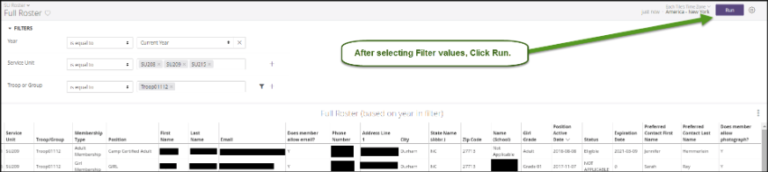
Full Roster – Dashboard
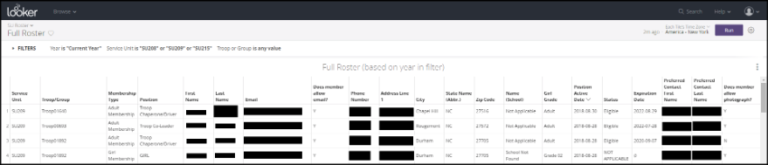
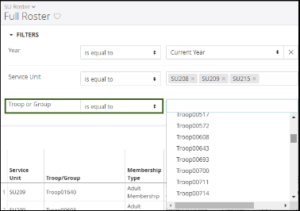
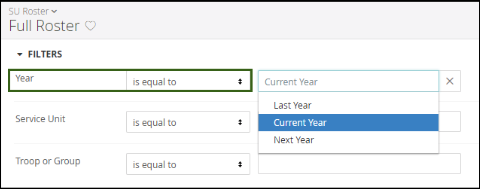
Full Roster Page Filters

  1. You can filter on year (October 1-March 31: filter by Current year or Last Year. April 1-September 30: filter by Current Year or Next Year).
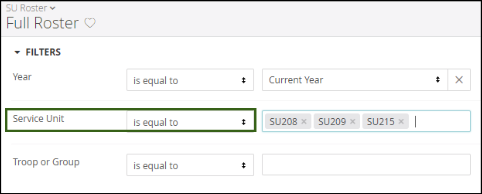
  2. You can filter on community/area (one or more depending on roles held).
  3. You can filter on troop or group.
  4. Click RUN to see filters applied.
Member Analysis Dashboard toggle arrow

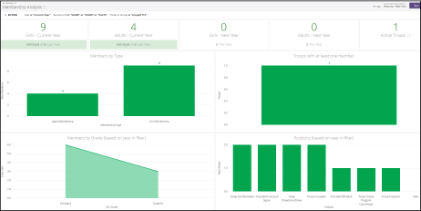
Member Analysis – Location on Home page
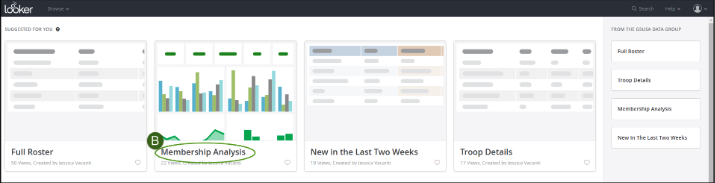
Member Analysis – Page Filters

Note: Filters are the same as the filters on the Full Roster Dashboard.
  1. You can filter on year (October 1-March 31: filter by Current year or Last Year. April 1-September 30: filter by Current Year or Next Year).
  2. You can filter on community/area (one or more depending on roles held).
  3. You can filter on troop or group.
  4. Click RUN to see filters applied.

New in the Last Two Weeks Dashboard toggle arrow

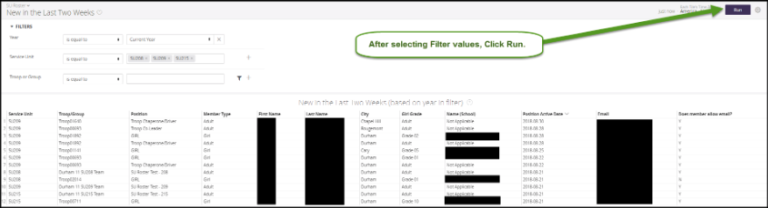
New in the Last Two Weeks – Location on Home page
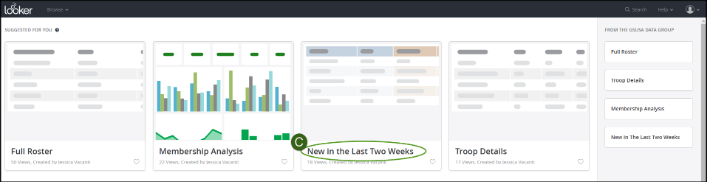
New in the Last Two Weeks – Page Filters

Note: Filters are the same as the filters on the Full Roster Dashboard.
  1. You can filter on year (October 1-March 31: filter by Current year or Last Year. April 1-September 30: filter by Current Year or Next Year).
  2. You can filter on community/area (one or more depending on roles held).
  3. You can filter on troop or group.
  4. Click RUN to see filters applied.
Troop Details Dashboard toggle arrow

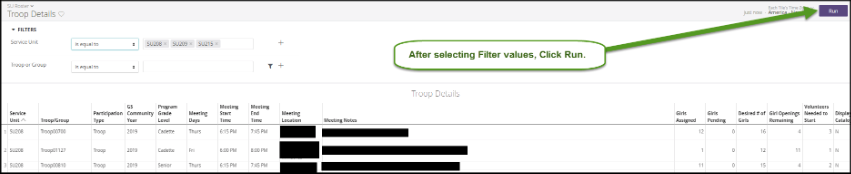
Troop Details – Location on Home page

Note: Filters are the same as the filters on the Full Roster Dashboard.
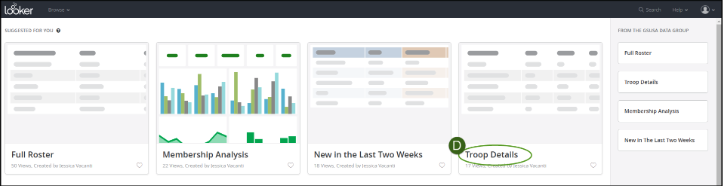
Troop Details – Page Filters

  1. You can filter on year (October 1-March 31: filter by Current year or Last Year. April 1-September 30: filter by Current Year or Next Year).
  2. You can filter on community/area (one or more depending on roles held).
  3. You can filter on troop or group.
  4. Click RUN to see filters applied.
Sidebar toggle arrow

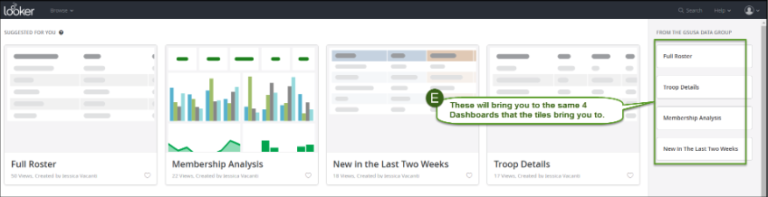
On the right-hand side of the Home page you will see a sidebar with four sections. Each section will bring you to the same four dashboards that the tiles will bring you.
JOIN
VOLUNTEER
DONATE
  • Instagram
  • Twitter
  • LinkedIn
  • Youtube
  • Pinterst
  • Facebook
  • Contact Us
  • Staff Directory
  • Terms and Conditions
  • Privacy Policy

© 2016-2026 Girl Scouts Heart of Michigan. 

A 501(c)(3) Organization. All Rights Reserved.

Join

Volunteer

Donate

close